How to make videos with Claude Code
You asked Claude Code for a video. It gave you a script, a shot list and an offer to write a project you would render yourself. That is what a text model can do, and it is where most Claude Code video generation stops: the agent describes the video, and you go and find the tool that makes it.
This guide connects Claude Code to Clipwright.io(opens in new tab) so the agent does the making. By the end, your agent can quote a video, make it and hand you the file. One limit up front: Clipwright.io returns files and posts nothing anywhere, so you still decide where each video goes.
The same setup works in Cursor, VS Code, Codex and claude.ai. The commands for each are in step 5. ChatGPT connects too, on the web: see can ChatGPT generate video.
What you need before you start
- Claude Code installed.
- A Clipwright.io account. You sign in in the browser the first time the agent uses the server, and a new account starts with 1,000 trial credits (checked 2026-11-18, see pricing(opens in new tab)).
- Nothing else. The hosted server needs no API key.
Step 1: Connect Claude Code to the MCP server
By the end of this step Claude Code can see the Clipwright.io tools. MCP (Model Context Protocol) is the standard way a coding agent gets new tools, and Clipwright.io runs one at https://mcp.clipwright.io/mcp. One command adds it:
1claude mcp add --transport http clipwright https://mcp.clipwright.io/mcp
The first time the agent uses a Clipwright.io tool, a browser tab opens for you to sign in and approve it. No key goes into your terminal or your chat. The Claude Code MCP docs(opens in new tab) explain the command's options.
Check: ask Claude Code which Clipwright.io tools it can see. You should get a list that includes video, image and voice tools.
Step 2: Ask for a video and read the quote
By the end of this step you have a price in front of you and nothing spent.
Every paid Clipwright.io tool has a free quote tool that goes first. Your agent calls the quote, shows you the credits and waits for your yes. Try this in Claude Code:
Make a 20-second vertical video for my project, a tool that turns support emails into a changelog. Quote it first and show me the credits before you make anything.
Read the number before you answer. If it is bigger than you expected, ask for a shorter video and a new quote; the quote is free. Prices change, so link the price list(opens in new tab) instead of trusting a figure in a blog post, this one included.
Step 3: Start from a reel that already worked
A blank script is the slow way to a good video. The agent can start from what is already working in your niche.
Give the agent a topic in a few words and let it run the chain:
- Find reels that took off on that topic.
- Break one down: its hook, its structure, its pacing.
- Plan a remake on that structure, with your product and your words, and show you the script.
- You approve the script. Only then does it quote and run.
If you already have a reel you like, hand it over and start at the breakdown. Each step that costs credits has its own free quote, so the chain is safe to walk one stage at a time.
Here is the prompt for the first video:
Find reels that took off for "support email tools" this week. Break the best one down, then plan a remake for my product. Show me the script before anything is made.
The remake copies the mechanic, never the words. You get the order of the hook, the reveal and the call to action, written in your voice.
Step 4: Pick who makes the video
There are two ways to get the file, and the second one is the reason to do this from Claude Code.
| Done for you | Your agent directs | |
|---|---|---|
You say | "Make a presenter ad from this script" or "make a faceless explainer" | "Write the shot list, then make each shot and cut it together" |
Who does the work | Clipwright.io, in one request | Claude Code decides; Clipwright.io makes, checks and cuts the parts |
Best for | A finished presenter ad or a narrated faceless video fast | A video your agent has to shape: your shots, your order, your retakes |
Both routes start from the same script and end in a file. The second one keeps the decisions inside Claude Code.
Done for you is the right start if you want a finished video and have no opinion about the shots. A presenter video or a faceless narrated one is a single request after the quote.
Your agent directs is the Claude Code way. The agent reads a guide first (free), then asks for pieces: an image, a clip, a voice. It checks each take before it keeps it, and it cuts the finished video.
A take check costs 10 credits, and cutting the video with render_edit costs 10 credits a video (checked 2026-11-18, see pricing(opens in new tab)). Your agent quotes each of them before it runs.
What the agent-directed route made
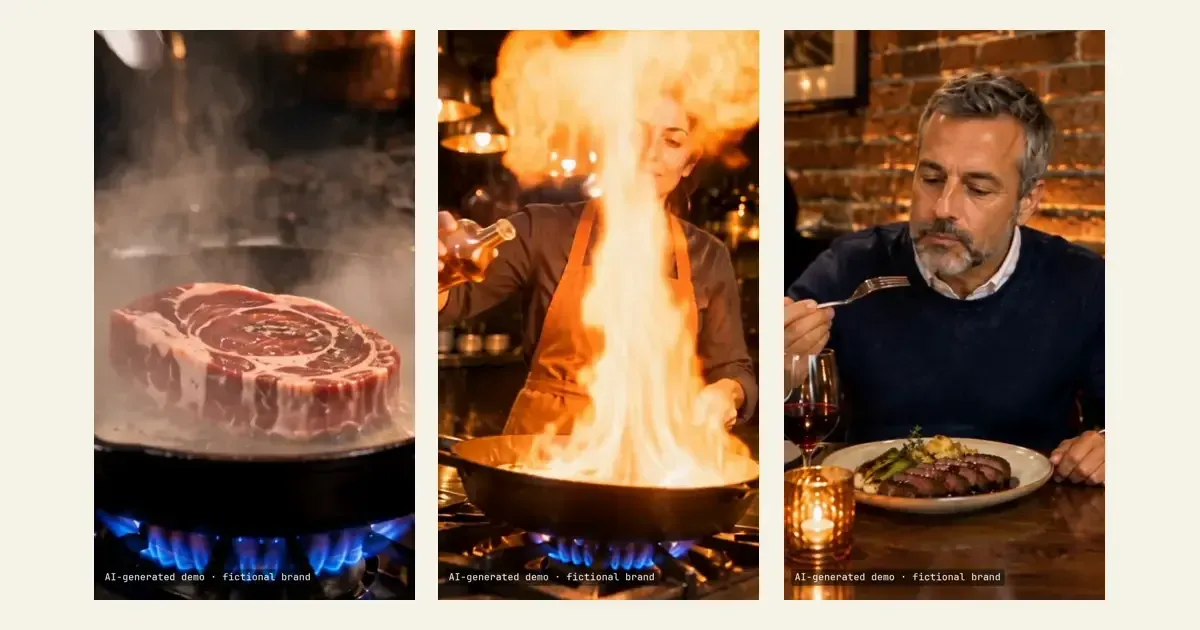
Here is one run of the second route, for a fictional bistro called Salt & Ember. A fresh agent session got a reference reel and a brief, and used only the hosted Clipwright.io server and its public guides, on a test account.
- It read the ad guide, then made 8 pictures with
generate_image: sheets for the chef, the guest, the kitchen, the dining room and the dish, and three storyboards. - It made 4 clips with their own sound with
generate_video, on the model it picked,seedance-2.5-flash. - It ran
check_takeon every take before keeping it. - It made one closing voice line with
make_voice. - It cut 29 seconds with
render_edit: captions, a music bed from the library, and each clip's own sound.
The agent wrote the script, the shot plan and the prompts, read every take by its frames and picked the cut points. Its brief also carried three notes from viewers' comments on the reference reel: stay longer on the cooking, let the guest react rather than the chef, and end on the plate landing, then the name, then "Book your table for Friday". The run took about 30 minutes and 783 credits from start to file, and failed attempts cost nothing.
AI-generated demo ad for a fictional bistro. The chef, the guest and his line are generated, so the video carries a visible label. For why that matters in a real ad, see are AI UGC ads legal.
Step 5: The same server in other clients
The hosted address is the same in every client; only the config differs.
Cursor, in your MCP settings:
1{ "mcpServers": { "clipwright": { "url": "https://mcp.clipwright.io/mcp" } } }
VS Code:
1{ "mcpServers": { "clipwright": { "type": "http", "url": "https://mcp.clipwright.io/mcp" } } }
Codex:
1codex mcp add clipwright --url https://mcp.clipwright.io/mcp
claude.ai: Customize, then Connectors, then Add custom, with the same URL.
Prefer a local server with a key? Create a key at app.clipwright.io/api-keys(opens in new tab) and run the npm package over stdio. Put your own key where it says cw_...:
1claude mcp add clipwright -e CLIPWRIGHT_API_KEY=cw_... -- npx -y -p @clipwright/mcp-server clipwright-mcp
What comes back
The done-for-you route returns a finished file from one request. Two of them from Clipwright.io, for scale. The first is about 15 seconds and vertical. It began as a few lines of text and a voice preset, and its own captions say it needed "no camera, no studio, no editing".
The second is a landscape explainer of 21 seconds. For a longer how-to or a product walkthrough, a faceless explainer is the format to ask for.
Faceless shorts can go the agent-directed way too: narration over scenes, no one on camera. Each of the three below came from a fresh agent session with a client's brief, using the Clipwright.io MCP server and its API. The agent wrote the narration, made the pictures and clips and cut the short. In the first two a cartoon hero stays the same in every shot: a coffee bean with three coffee mistakes, then a tooth with three brushing mistakes.
The third is a list: five facts about honey, in 28 seconds. It opens on a jar of hard honey and ends with the same jar runny again.
If your video needs a recurring character, the brand mascot guide shows how an explainer keeps one.
Common mistakes
Saying yes before you read the quote. The agent waits for your go-ahead. Read the credits first; the quote is free, so a second quote with a shorter script costs you nothing.
Starting from a blank script. A script written from nothing has no proof it works. Start from a reel that took off in your niche, as in step 3, and write on its structure.
Expecting the video to be posted. Clipwright.io makes the file and stops there. You upload it yourself.
Quoting video prices from memory. Per-second video prices vary by model and resolution. Ask for a quote and read pricing(opens in new tab).
FAQ
Can Claude Code generate video by itself?
No. Claude Code is a text and code model and has no video model of its own. It can write the script and plan the shots; to get an actual file it calls a tool such as an MCP server that makes video.
Do I need an API key?
Not for the hosted server. You sign in in the browser the first time the agent uses it. A key is only needed for the local npm server, in step 5.
Does it work in Cursor, VS Code and Codex?
Yes. The server is the same, only the config line differs. Step 5 has each one.
Can the agent spend my credits without asking?
Every paid tool has a free quote first, and the agent is set up to show you the credits and wait for your yes. Read the quote each time.
Which route should I start with?
Start with done for you, to see the output. Move to the agent-directed route when you want your own shots, your own order and retakes decided by Claude Code.
Try it with one reel
Pick one reel in your niche that got more views than its creator usually gets. Run the one-line command from step 1, then paste the first prompt from step 3 into Claude Code. Read the quote it shows you, and say yes only to the script you like. For more on running ad variants in batches, see the UGC ad loop playbook and the live shots guide.
For your agent
Paste this into Claude Code after connecting:
Use the Clipwright.io MCP server. Before any paid call, call the matching quote tool, show me the credits and wait for my yes. Start from what works: find trends for my topic, analyze one reference, plan a remake, and show me the script. For a finished video, use make_ugc (presenter) or make_faceless (narrated explainer). If I want to direct it, read get_ad_guide or get_film_guide first (both free), then generate_image, generate_video and make_voice for the parts, check_take on each take, and render_edit or render_cut to cut the video.
The order of the stages: find_trends, analyze_reference, plan_reference_remake, approve_workflow_plan, a quote, then the run. A user who brings their own reel starts at analyze_reference. Run describe_tool on make_faceless before using its options.
Your agent wrote the video. You still have to make it.
Every hour between the shot list and the finished file is yours. Connect Clipwright.io once, and your agent makes the parts and hands back the file.
Connect your agentAbout the Author

Founder at Dimantika
Co-founder of Dimantika, the company behind Clipwright.io and ViralFaceless. Builds both with coding agents. Previously ran GlockSoft with a partner for about 15 years. Writes here about handing video production to agents.
View all postsMore articles you might like.
Keep one brand mascot in every explainer video
Your agent draws a new hero for each explainer, so a series looks like five brands. Save the first one as a mascot and reuse it with one field.
Claude video generation and editing, no terminal needed
Claude video generation in the Claude app: what Claude makes by itself, how a connector adds real video, and what editing in a chat can and can't do.

Can ChatGPT generate video? Not alone. Give it a studio
Can ChatGPT generate video? Not by itself, and Sora is gone. Add a video plugin on the web and you can order one from the chat, with a free quote first.